Here is an overview of the main online platforms you will use throughout your studies.
Auriga#
auriga.epita.fr (sign in with Microsoft)
Auriga is the school’s administrative portal. This is where you handle administrative formalities: updating your personal information, downloading your enrollment certificate, checking your grades and timetable.
Zendesk#
support.epita.fr (sign in with Microsoft)
Zendesk is the single point of contact for reaching EPITA’s teams. Whether your question relates to your studies, an internship, work-study, an international exchange, or a technical issue, this is where you submit your request.
Zeus#
zeus.ionis-it.com (sign in with Microsoft)
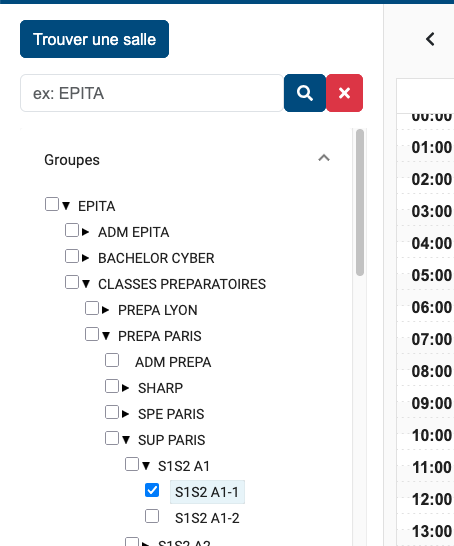
Zeus is the former timetable management tool, used as a fallback during the transition to Auriga. To find your schedule, expand the menu on the left by browsing through the categories to your class, then check the corresponding box.
For example: EPITA > Classes préparatoires > PREPA PARIS > SUP PARIS > S1S2 A1 > S1S2 A1-1
Moodle#
moodle.epita.fr (sign in with Forge)
Moodle is the course resource platform. Teachers upload their course materials there and use it to send announcements to students, which are then forwarded by email.
Edusign#
edusign.app/student (sign in with Microsoft)
Edusign is used to verify attendance in class. You will need to sign in at the beginning of each session to confirm your presence.